Referrer Discount Pop-Up
The Referrer Discount Pop-Up card controls a pop-up that tells the referrer (the shopper who shared their cart) that they have earned a discount. The pop-up appears on your store when Share Cart applies the referrer's discount to their cart.
This page shows you how to turn on the pop-up, change its colors and edit its text.
Note: Incentives are part of the Pro plan.
Before You Start#
- Turn on Offer a discount to referrers on the Incentives page. The Referrer Discount Pop-Up card appears only when the referrer discount is on. See Referrer Incentives.
- On the Pro plan, the Incentive Design row appears on the Dashboard once at least one discount is on. If your store isn't on Pro, the row is shown with a PRO badge and can't be opened.
How to Turn On the Referrer Discount Pop-Up#
Step 1: In your Shopify admin, under Apps, click Bevy Share Cart - Social Link. The app opens on its Dashboard.
Step 2: In the settings list, click Incentive Design.
Step 3: Click the Referrer Discount Pop-Up card to expand it.
Step 4: Make sure Show Referrer Incentive Pop-Up Announcement is selected. Share Cart selects it for you when you turn on the referrer discount on the Incentives page. Clear it to hide the pop-up. The color settings appear while it is selected. To see the pop-up, select Referrer Discount Pop-Up from the view dropdown in the Design Preview.
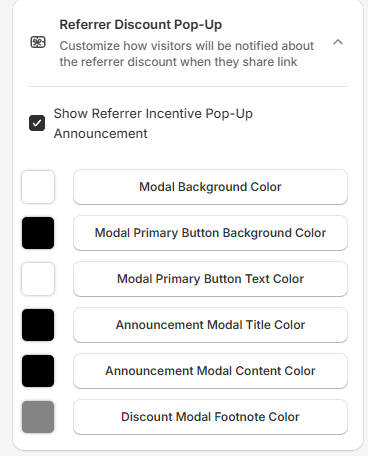
Step 5: Change the colors and text you need. See below.
Step 6: Click Save in the save bar at the top of the page. Your changes are not live on your store until you save. To undo unsaved changes, click Discard.
Referrer Discount Pop-Up Colors#
| Setting | What it changes | Default |
|---|---|---|
| Modal Background Color | The background of the pop-up | White |
| Modal Primary Button Background Color | The button background | Black |
| Modal Primary Button Text Color | The button text | White |
| Announcement Modal Title Color | The pop-up title | Black |
| Announcement Modal Content Color | The pop-up message | Black |
| Discount Modal Footnote Color | The footnote below the button | Grey |
How to Edit the Pop-Up Text#
Step 1: In the Design Preview, select Referrer Discount Pop-Up from the view dropdown. This view shows the pop-up as referrers see it on your store. It is only in the dropdown while Show Referrer Incentive Pop-Up Announcement is selected.
Step 2: Edit the fields below the preview:
| Field | What it changes | Limit | Default |
|---|---|---|---|
| Pop-Up Title | The title at the top | 30 characters | Good News! |
| Pop-Up Message | The message below the title | 200 characters | Depends on your referrer discount (see below) |
| Pop-Up Button | The button text | 30 characters | Start Shopping |
| Pop-Up Footnote | The small note below the button | 30 characters | Discount applied on checkout |
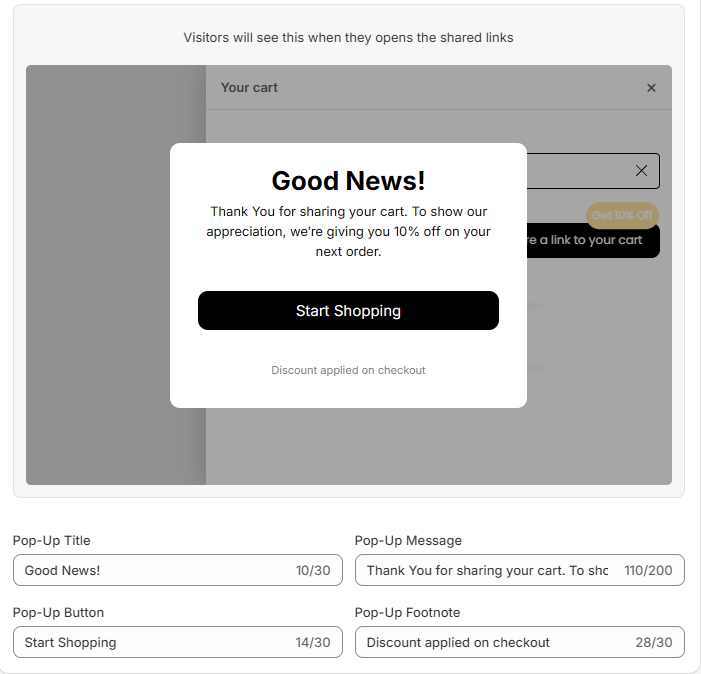
Step 3: Click Save in the save bar.
Which Pop-Up Message Am I Editing?#
Share Cart keeps a separate message for each referrer discount setup. The Pop-Up Message field always edits the message for your current setup. Use *|amount|* to show the discount amount.
| Your referrer discount setup | Default message |
|---|---|
| The referrer gets the discount only after the recipient checks out | Someone recently made a purchase on our store using the cart you shared. To show our appreciation, we’re giving you *|amount|* off on your next order. |
| The referrer gets the discount without waiting for a checkout | Thank You for sharing your cart. To show our appreciation, we’re giving you *|amount|* off on your next order. |
| Manual discounts | Thank you for sharing your cart. To show our appreciation, we're giving you an exclusive discount on your next order. |
The first message is used when Referrer will be eligible for discount only IF the Recipient performs checkout using the shared link first is selected on the Incentives page.
For any queries, feel free to contact us via live chat or email support@bevycommerce.com. We're always here to help!