How to Switch Subscriptions
The Subscription page shows Share Cart's two plans, what each one includes, and which plan your store is on. You use it to start a free trial, upgrade, switch plans or cancel.
This page explains each of those tasks and what happens after you confirm.
How to Open the Subscription Page#
In your Shopify admin, under Apps, click Bevy Share Cart - Social Link, then click Subscription.
You can also reach it from the Dashboard: click See plans in the Choose a plan to turn on cart sharing banner, or View plans in the Did you know? banner.
Plans at a Glance#
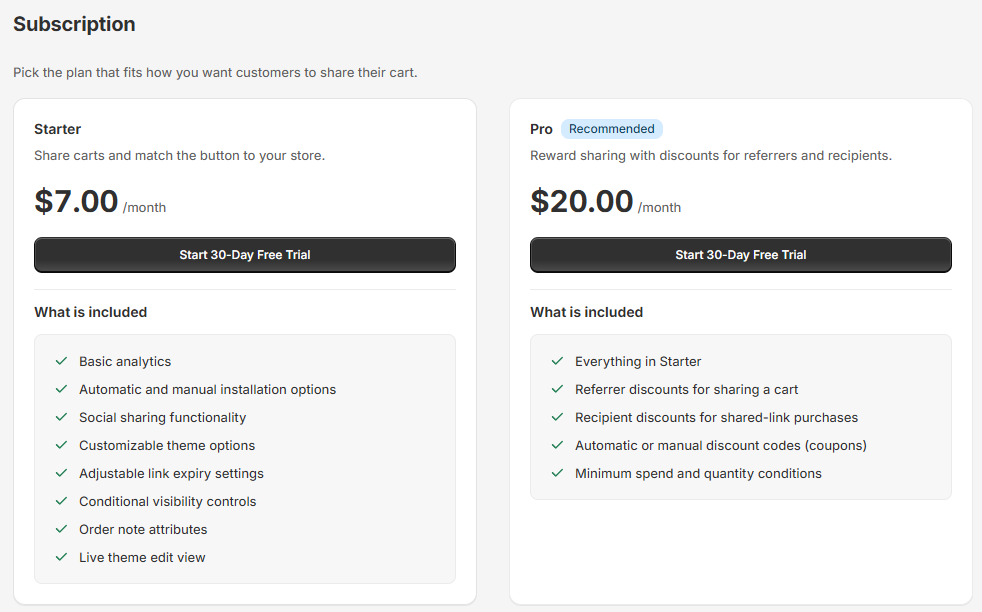
The page shows two plan cards. Each card lists its price and a What is included list.
| Plan | Price | What it adds |
|---|---|---|
| Starter | $7.00/month | Cart sharing, social sharing, themes and customization, link expiry, visibility controls, order note attributes and basic analytics. |
| Pro | $20.00/month | Everything in Starter, plus referrer and recipient discounts, automatic or manual discount codes, and minimum spend and quantity conditions. |
The plan you are on shows a green Current plan badge and a Currently Active button. When you are not on Pro, the Pro card shows a Recommended badge.
The image below shows a store that hasn't chosen a plan yet. Starter costs $7.00/month and Pro costs $20.00/month with a Recommended badge, and both cards show a Start 30-Day Free Trial button.
For the full feature lists, read Why Use Share Cart?
How to Start a Free Trial#
Both plans include a 30-day free trial. Each store gets one free trial.
Step 1: On the plan you want, click Start 30-Day Free Trial.
Step 2: A dialog titled Start your 30-day free trial of Starter (or of Pro) opens. It lists what to expect, including No charge today and the monthly price after the trial ends.
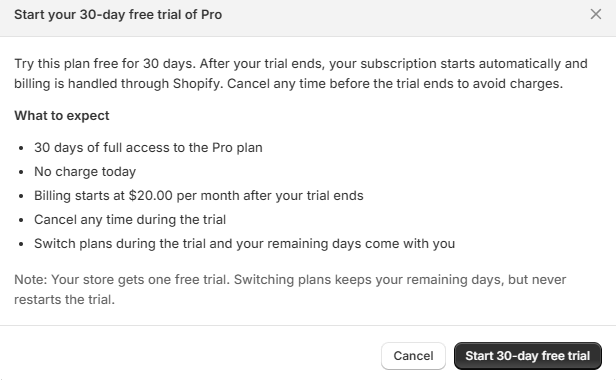
Under What to expect, the Pro dialog lists 30 days of full access to the Pro plan, no charge today, billing at $20.00 per month after your trial ends, that you can cancel any time during the trial, and that your remaining days come with you if you switch plans during the trial. A note below reminds you that your store gets one free trial.
Step 3: Click Start 30-day free trial.
Step 4: Shopify's charge approval page opens. Approve the charge to start your trial.
You are not charged during the trial. Billing starts automatically when the trial ends, unless you cancel first.
Note: If your store has already used its free trial, the button reads Subscribe to Starter or Subscribe to Pro instead, and billing starts right away.
How to Upgrade From Starter to Pro#
Step 1: On the Pro card, click Upgrade to Pro. Depending on your store's plan and trial history, the button may read Subscribe to Pro or Start 30-Day Free Trial instead.
Step 2: Confirm in the dialog:
- If you are still in your free trial, the dialog is titled Switch to Pro. Your remaining trial days move to Pro, and there is no charge today. Click Switch to Pro.
- If your store has not used its free trial yet, the dialog is titled Start your 30-day free trial of Pro. Click Start 30-day free trial.
- Otherwise, the dialog is titled Subscribe to Pro. Billing starts today. Click Subscribe.
Step 3: Approve the charge on Shopify's page.
Once Pro is active, you can set up discounts on the Incentives page. See What are Incentives?
How to Switch From Pro to Starter#
Step 1: On the Starter card, click Switch to Starter.
Step 2: Read the Switch to Starter? dialog. Under What happens next it explains:
- You are billed $7.00 per month instead of $20.00. If you are still in your free trial, your remaining days move to Starter and there is no charge today.
- Cart sharing keeps working.
- Discount incentives stop immediately, so customers will not receive discounts when they share their cart.
- Your incentive settings are kept if you move back to Pro.
Step 3: Click Switch to Starter, then approve the change on Shopify's page. To stay on Pro, click Keep Pro.
How to Cancel Your Subscription#
Step 1: On your current plan, click Cancel subscription.
Step 2: Read the Cancel your Starter subscription? (or Cancel your Pro subscription?) dialog. Under What happens next it explains:
- Billing stops, and you will not be charged again.
- If you are in your free trial, the trial ends now and will not come back.
- The share button is removed from your storefront.
- Your settings are kept, so subscribing again restores them.
Step 3: Click Cancel subscription to confirm, or Keep my subscription to go back.
Good to Know#
- One free trial per store. Switching plans during the trial keeps your remaining days but never restarts the trial.
- Billing is handled through Shopify. Share Cart charges appear on your Shopify bill.
- Plan changes need your approval. After you confirm in Share Cart, Shopify asks you to approve the charge before it takes effect.
If you have any questions, reach out to support via live chat or email support@bevycommerce.com. We're always here to help!