Visibility
The Visibility card controls who sees the Share Button on your store. You can show it to everyone, only to logged-in customers, or only to logged-in customers with certain customer tags.
This page shows you where to find Visibility and how to limit who sees the Share Button.
How to Limit Who Sees the Share Button#
Step 1: In your Shopify admin, under Apps, click Bevy Share Cart - Social Link. The app opens on its Dashboard.
Step 2: In the settings list, click Display Settings.
Step 3: Click the Visibility card to expand it.
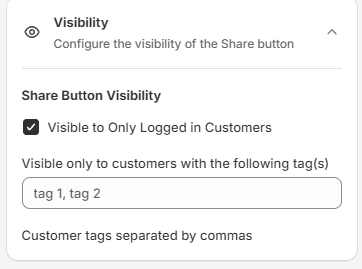
Step 4: Under Share Button Visibility, select Visible to Only Logged in Customers. Only customers who are logged in to your store now see the Share Button.
Step 5 (optional): To show the button only to some logged-in customers, enter customer tags in Visible only to customers with the following tag(s), separated by commas. A customer must have all the tags you enter to see the button. For example, VIP, wholesale shows it only to customers tagged both VIP and wholesale. Tags are not case-sensitive. Leave the field empty to show the button to all logged-in customers.
Step 6: Click Save in the save bar at the top of the page. Your changes are not live on your store until you save. To undo unsaved changes, click Discard.
How to Show the Share Button to Everyone#
Clear the Visible to Only Logged in Customers checkbox and click Save. Everyone who visits your store sees the Share Button. This is the default.
If you have any questions or need assistance, reach out to support via live chat or email support@bevycommerce.com. We're here to help!