What are Incentives?
Incentives are discounts you offer through Share Cart to reward cart sharing. You can reward the customer who shares a cart, the friend who checks out from the shared link, or both. This article explains the two kinds of incentive, the two ways to give a discount, who can receive incentives, and where you set everything up.
Note: Incentives are part of the Pro plan. See Why Use Incentives? for plan details.
Two Kinds of Incentive#
The Incentives page has a section for each kind of discount:
-
Recipient discount: "Recipients are the friends who open a shared cart link and check out." A recipient discount encourages them to complete the purchase. See Recipient Incentives.
-
Referrer discount: "Referrers are your own customers, rewarded for sharing their cart." A referrer discount thanks them for bringing new shoppers to your store. See Referrer Incentives.
You can turn on either one, or both.
Two Ways to Give a Discount#
For each kind of incentive, you choose a Discount method:
-
Automatic discounts: The app generates discount codes and applies them for you. You choose a Discount Type (Percentage or Flat), a Discount Amount and optional checkout conditions. Each code the app creates is for a single use and appears in your Shopify admin under Discounts.
-
Manual discounts: You use discount codes you have created yourself in Shopify. You paste or import the codes into the app, and the app hands them out one at a time. The value and any minimums come from the Shopify discount itself.
Who Can Receive Incentives#
The Customer eligibility section at the top of the Incentives page controls which shoppers can receive incentives. It applies to both the recipient and the referrer discount.
- When Give incentives to logged-in customers only is checked, customers who aren't logged in to your store won't receive discounts.
- When it is unchecked (the default), customers who aren't logged in also receive discounts.
Where to Set It Up#
Step 1: In your Shopify admin, under Apps, click Bevy Share Cart - Social Link, then click Incentives.
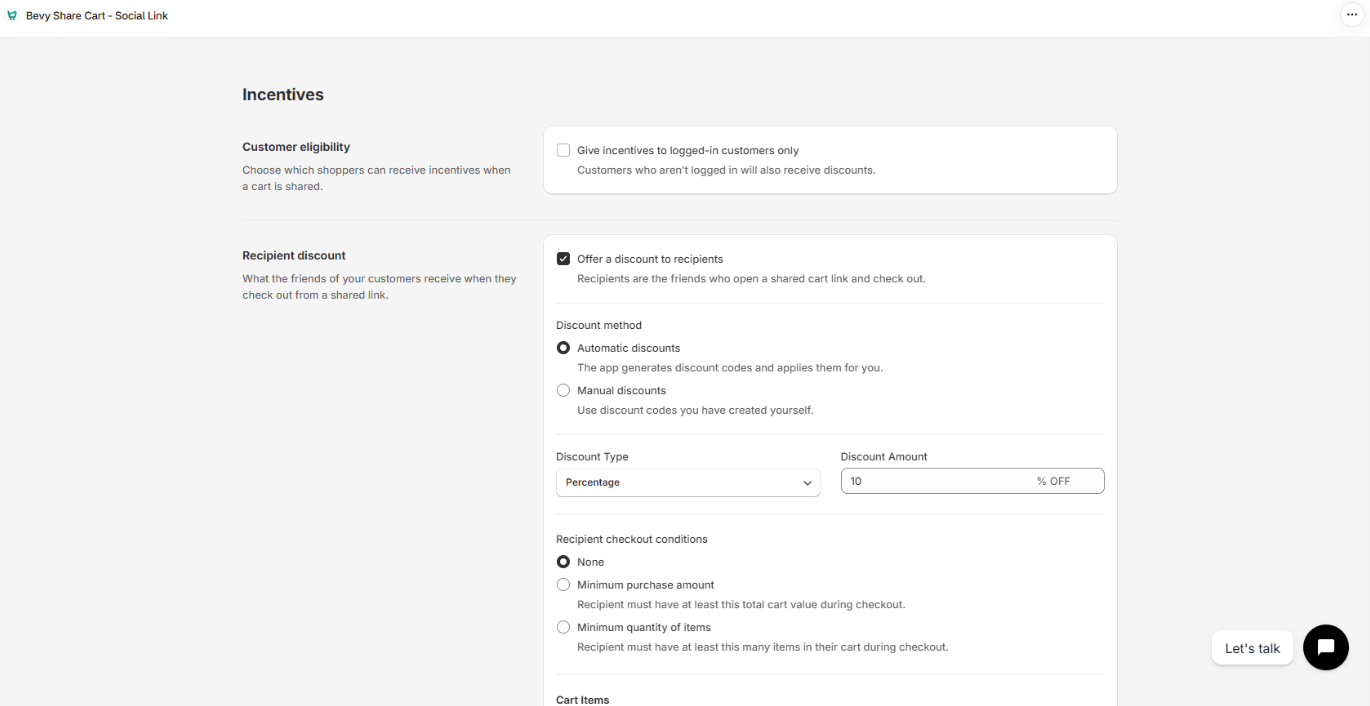
Step 2: Set up the Customer eligibility, Recipient discount and Referrer discount sections.
Step 3: Click Save in the save bar at the top of the page. Your changes are not live until you save. Click Discard to undo unsaved changes.
How incentives look to shoppers is set separately. On the app's Dashboard, open Incentive Design to style the discount announcement on the Share Button, the discount details in the Share Pop-Up, the recipient discount banner and pop-up, and the referrer discount pop-up. On the Pro plan, the Incentive Design row appears on the Dashboard once at least one discount is on. If your store isn't on Pro, the row is shown with a PRO badge and can't be opened.
For any queries, reach out to us via live chat or drop an email at support@bevycommerce.com. We're always happy to hear from you!