Links
The Links card controls when shared cart links expire. You can limit how many times a link can be opened, how long it stays active, or both. If you don't set either option, shared links don't expire.
This page shows you where to find Links and how each expiry option works.
How to Set Link Expiry#
Step 1: In your Shopify admin, under Apps, click Bevy Share Cart - Social Link. The app opens on its Dashboard.
Step 2: In the settings list, click Display Settings.
Step 3: Click the Links card to expand it. Under Expire Shared Links After, you see two checkboxes. Both are off by default.
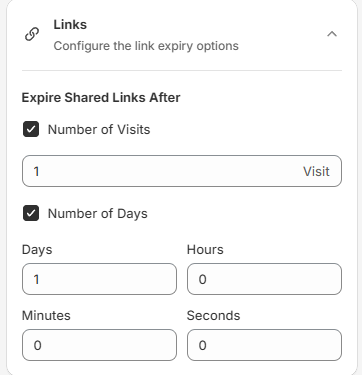
Step 4: Select Number of Visits, Number of Days, or both, and enter your values. See below.
Step 5: Click Save in the save bar at the top of the page. Your changes are not live on your store until you save. To undo unsaved changes, click Discard.
Number of Visits#
Select Number of Visits and enter how many times a shared link can be opened. The field shows Visit or Visits after the number. The value must be at least 1, otherwise you see "Invalid Input". The default is 1.
For example, if you enter 5, the recipient can open the shared cart 5 times. After that, the link expires.
Number of Days#
Select Number of Days and enter how long a shared link stays active in the Days, Hours, Minutes and Seconds fields. The fields accept whole numbers only. Hours goes up to 23, and Minutes and Seconds go up to 59. The default is 1 day. The time counts from when the cart is first shared.
For example, if you enter 2 days, 4 hours, 15 minutes and 59 seconds, the recipient can open the shared cart for 2 days, 4 hours, 15 minutes and 59 seconds. After that, the link expires.
If you have any questions, contact us via live chat or email support@bevycommerce.com.