Order Note Attribute
The Order Note Attribute card adds the referrer's and the recipient's details to orders placed with a Share Cart discount. This helps you see who shared the cart and who used it, right on the order in Shopify.
This page shows you where to find the setting, what it adds to your orders, and where to see it.
How to Turn On the Order Note Attribute#
Step 1: In your Shopify admin, under Apps, click Bevy Share Cart - Social Link. The app opens on its Dashboard.
Step 2: In the settings list, click Order Note Attributes.
Step 3: Click the Order Note Attribute card to expand it.
Step 4: Select the Add Order Note Attribute checkbox. It is off by default.
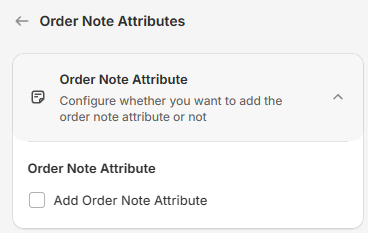
Step 5: Click Save in the save bar at the top of the page. Your changes are not live on your store until you save. To undo unsaved changes, click Discard.
What Gets Added to Orders?#
When Add Order Note Attribute is on, orders placed with a Share Cart discount get these extra attributes:
| Attribute | What it shows |
|---|---|
bevyShareCartReferrerId | The customer ID of the referrer (the shopper who shared the cart) |
bevyShareCartReferrerName | The referrer's name |
bevyShareCartReferrerEmail | The referrer's email |
bevyShareCartRecipientId | The customer ID of the recipient (the shopper who opened the shared cart) |
bevyShareCartRecipientName | The recipient's name |
bevyShareCartRecipientEmail | The recipient's email |
When a detail is not known, for example the recipient on an order where the referrer used their own reward, the value shows as N/A.
To see them, open the order in your Shopify admin and look under Additional details.
Orders that come from a shared cart without a Share Cart discount keep only Share Cart's own tracking attributes, such as ShareCart and cartId, while the setting is on.
When the setting is off, Share Cart removes its own tracking attributes, such as ShareCart and cartId, from the order, so your orders stay clean.
For any queries, feel free to contact us via live chat or email support@bevycommerce.com. We're always here to help!