Advanced Rules
The Advanced Rules section lets you refine your pricing strategy beyond simple discounts. By enabling this feature, you can control the cosmetic appearance of your prices using Rounding Rules and ensure profitability using Minimum Margin constraints.
These settings apply after your base discount (percentage or fixed amount) is calculated, acting as a final filter before the price is synced to Shopify.
To access these settings, locate the Advanced Rules toggle in the discount rule configuration section and turn it ON.
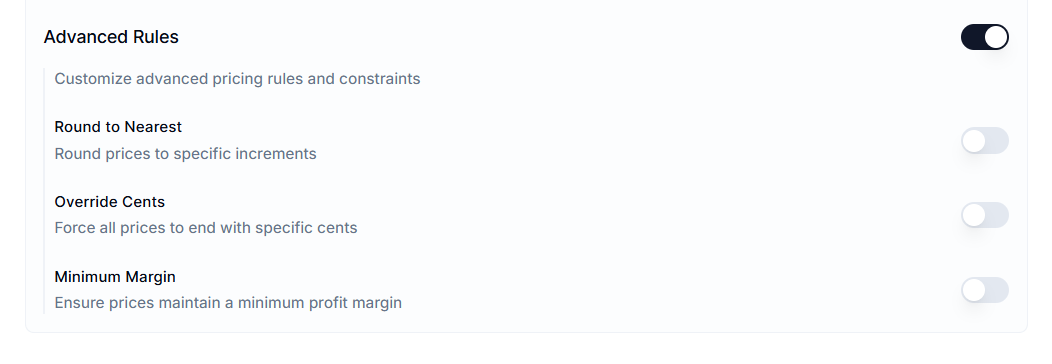
Rounding Rules#
Calculated discounts often result in unappealing numbers (e.g., a 20% discount on $24.50 results in $19.60). Rounding rules help you standardize these prices to look professional and psychologically appealing to customers.
You can choose between two rounding methods:
1. Round to Nearest#
This option adjusts the final calculated price to the nearest specified increment.
How to Use#
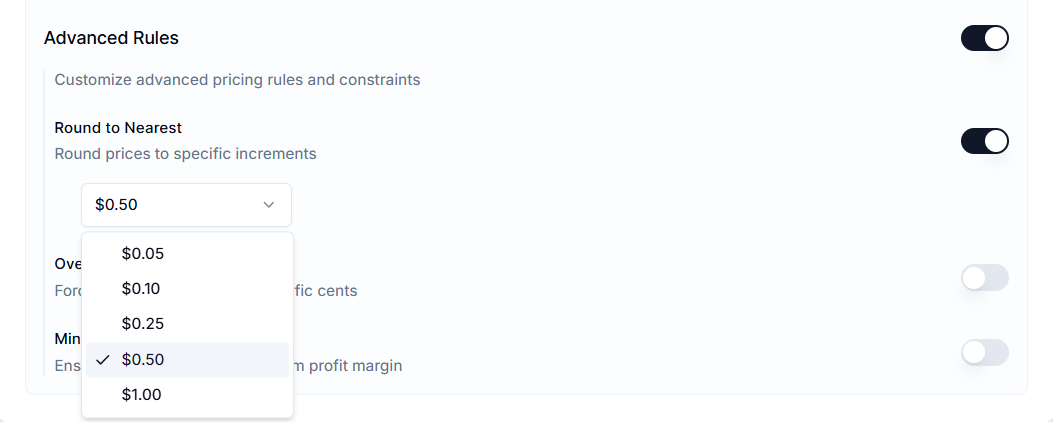
Enable Round to Nearest and select an increment from the dropdown menu (e.g., "Nearest 0.50", "Nearest 1.00").
Example:
If the calculated price is $14.20 and you select "Round to Nearest 0.50," the price becomes $14.50.
2. Override Cents#
This option forces the price to end in a specific number of cents, regardless of the mathematical result. This is commonly used for Charm Pricing strategies (e.g., prices ending in .99 or .95).
How to Use#
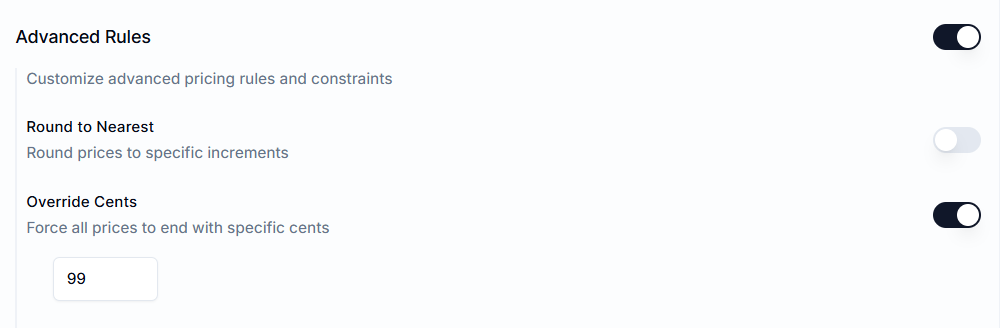
Enable Override Cents and enter your desired cent value (e.g., "99") in the text field.
Example:
If the calculated price is $14.42 and you set the override to 99, the final price becomes $14.99.
Minimum Margin#
The Minimum Margin feature acts as a safety net for your profitability. It ensures that an automated discount never reduces a product’s price below a specific profit threshold relative to its cost.
How to Use#
Enable Minimum Margin and enter a percentage value (e.g., "20%").
- Prerequisite: This feature requires that your products have a valid value in the Cost per item field in your Shopify admin.
How Margin is Calculated#
The app checks the product’s Cost per item and adds the percentage you define.
- Formula:
Minimum Price = Cost + (Cost * Margin %) - Behavior: If the calculated discounted price is lower than this Minimum Price, the app will override the discount and set the price to the Minimum Price.
Example:
- Product Cost: $10.00
- Minimum Margin: 20% (Minimum allowable price is $12.00).
- Sale Rule: 50% off a $20.00 listing price (Target Price: $10.00).
- Result: The app detects that $10.00 is below the $12.00 safety threshold. It sets the price to $12.00 instead of $10.00, protecting your margin.

Important Notes#
Order of Operations#
Understanding the calculation pipeline is critical for troubleshooting pricing outcomes. The system processes rules in this specific order:
- Base Calculation: The Percentage or Fixed Amount discount is applied to the original price.
- Rounding: The Rounding Rule (Nearest or Override) modifies the result.
- Margin Check: The system compares the rounded result against the Cost + Margin floor. If the price is too low, the Margin Guard overrides it.
Missing Cost Per Item#
If you enable Minimum Margin, but a product has a Cost per item set to 0.00 or is empty in Shopify:
- The system cannot calculate a safety floor.
- The discount will apply fully, with no restrictions.
Recommendation: Before running a margin-protected sale, verify that your Cost per item data is populated.
Strategic Use of Rounding#
Using Override Cents can sometimes slightly increase or decrease the effective discount percentage.
Example:#
A 10% discount on $100 results in $90. If you override cents to ".99", the price becomes $90.99.
Observation:#
While this technically reduces the discount slightly, studies show that $90.99 often converts better than $91.00 or $90.00 due to psychological pricing effects.
Mutual Exclusivity#
You can’t use Round to Nearest and Override Cents simultaneously. You must choose either to round to a math-based increment or to force a cosmetic ending.
Variant-specific Evaluation#
The app evaluates the minimum margin for each product variant individually. If a "Small" shirt costs you $5 and an "XXL" shirt costs you $7, the safety floor is calculated appropriately for each specific variant based on its unique cost.
Need Help?#
If you have questions about setting up Advanced Rules, our support team is here to help. We can guide you on:
- Choosing the right rounding method for your pricing strategy
- Configuring Minimum Margin to protect profitability
- Ensuring variant-level costs are properly evaluated
- Troubleshooting unexpected pricing outcomes in your rules
Email support@bevycommerce.com to make sure your rules always hit the right price points while protecting your margins.