Advanced Display Options
Bevy Design allows you to take control of your website in awesome ways whenever your overlay launches.
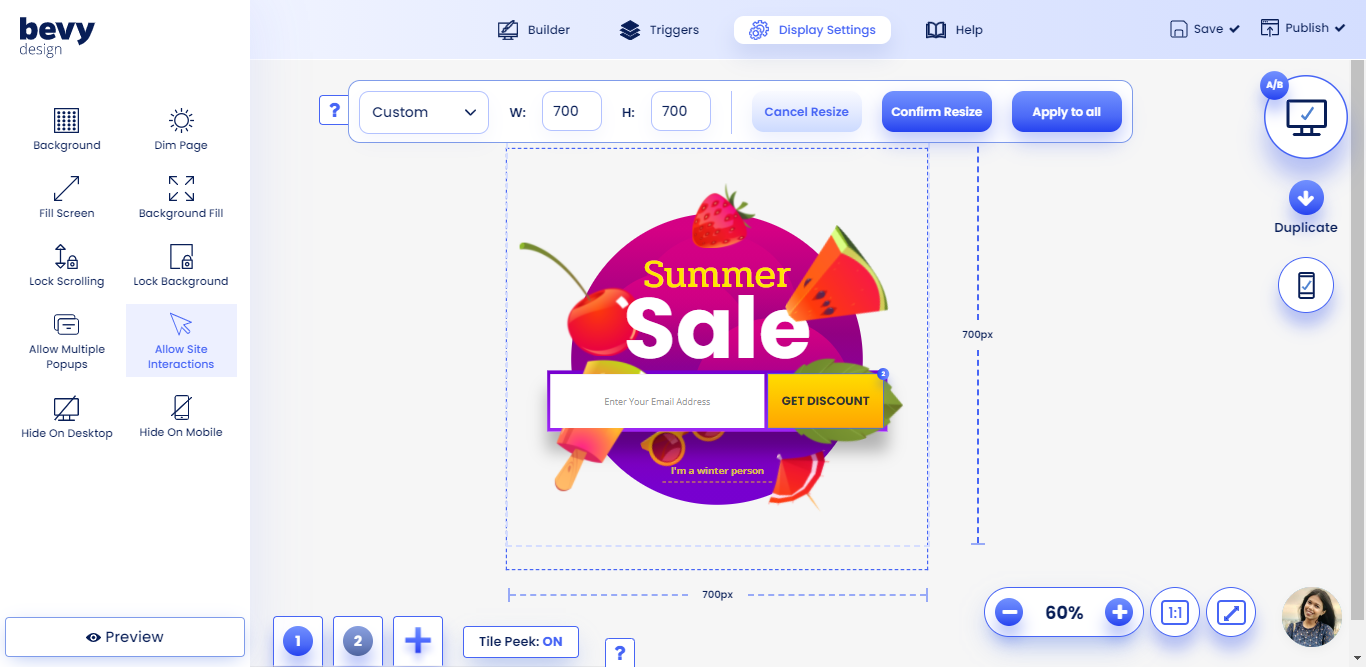
Dim Page#
This option allows the background to be dimmed when a campaign is displayed. However, this option is ignored for campaigns with site interactions turned on.
Fill Screen#
This option makes the campaign extend horizontally to the full size of the window.
Background Fill#
This option makes the campaign background extend to the full size of the window.
Lock Scrolling#
This option prevents users from scrolling on your site when the campaign is displayed.
Lock Background#
This option restricts the standard Bevy Design behavior of dismissing overlays once any area outside of the overlay is clicked.
IMPORTANT: Remember, enabling lock background can be VERY intrusive. Make sure you add a Cancel/Close Action to an element to allow users to navigate back to your page.
Allow Multiple Popups#
This option allows you to display multiple campaigns on the same page.
Allow Site Interactions#
This option allows users to navigate your page while the campaign remains visible
Hide on Desktop#
This option stops the campaign from being displayed on desktop devices.
Hide on Mobile#
This option stops the campaign from being displayed on mobile devices.